🧊 How to Fix: Freezing or Unresponsive Apps
Updated: 10/02/2025
Article #: 470
🔎 What This Guide Covers:
This guide helps you fix issues where an application (like Excel, Chrome, or Teams) freezes, becomes unresponsive, or stops responding to mouse or keyboard input. It shows how to force close the app, restart it, and reduce the chances of future freezing.
Use this guide when:
- An app says “Not Responding” and won’t react.
- You can’t click or interact with the app.
- Your entire screen seems frozen but your mouse still moves.
✅ Steps to Fix the Issue
Step 1: Try Closing the App Normally
If the app is slightly laggy, give it 10–15 seconds. Then try:
- Clicking the X on the top-right corner.

- Using Alt + F4 to close it (Windows shortcut).
If it doesn't close, move on to Step 2.
Step 2: Force Quit the App Using Task Manager
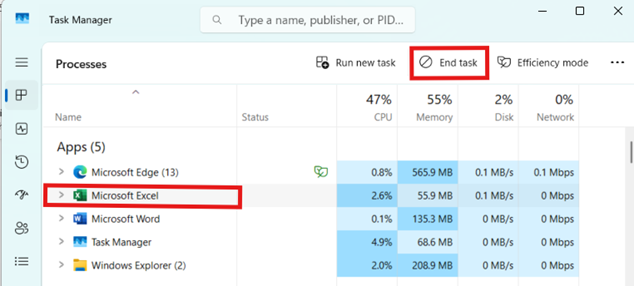
- Press Ctrl + Shift + Esc to open Task Manager.
- Look for the frozen app under the Processes tab.
- Click on the app name (eg. Microsoft Excel) → Click End Task in the top-right.
Step 3: Restart the App
- Reopen the app from your desktop or Start Menu.
- Check if it's working normally again.
Step 5: Restart the Computer (If Everything Freezes)
If your whole system becomes unresponsive:
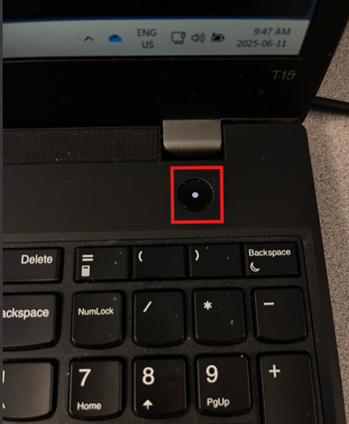
- Hold down the Power button on your computer for 5–10 seconds until it shuts down.
- Wait 10 seconds, then power it back on.
Step 6: Prevent Future Freezing
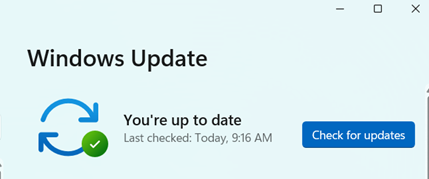
- Keep your apps and Windows updated.
- Restart your computer regularly.
- Avoid keeping too many browser tabs or heavy apps open at once.
- Consider clearing cache.
📝 If It Still Doesn’t Work:
- Uninstall and reinstall the problematic app.
- Make sure your computer has enough free storage and RAM.
- Escalate to IT through a ticket with the app name, time it froze, and any error messages.
|
Rate this Topic:
|
|||
|
