🔎 What This Guide Covers:
This guide is for when your computer turns on (you hear fans or see lights), but the monitor shows a black screen, says “No Signal”, or stays off entirely. It helps users troubleshoot common causes like loose cables, input issues, or display settings.
Use this guide when:
- Your monitor stays black even after starting your computer.
- You see a “No Signal” message on the screen.
- The monitor has power, but nothing is being displayed.
✅ Steps to Fix the Issue
🔌 Step 1: Check Cable Connections
Make sure all cables between the monitor and computer are securely plugged in.
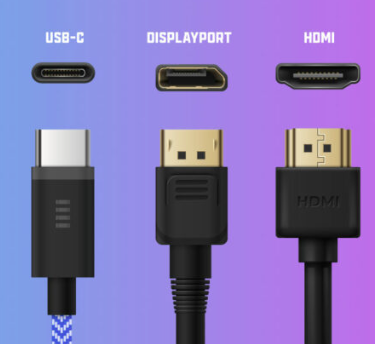
- HDMI, DisplayPort, or USB-C : Unplug and plug back into both the monitor and computer.
- Power cable: Make sure the monitor’s power cable is firmly connected and the outlet works.
💡 Step 2: Check if the Monitor Has Power
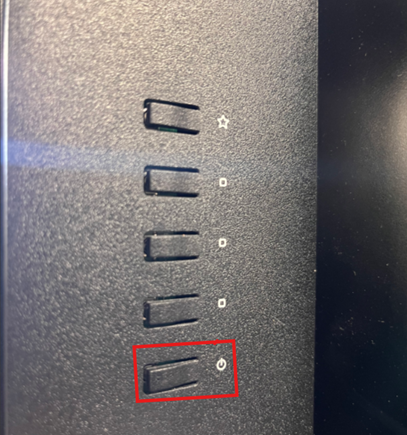
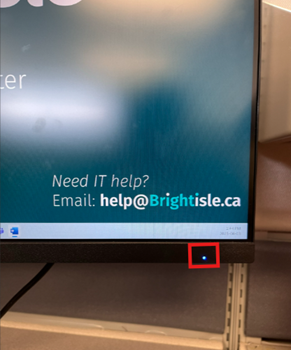
- Is the monitor’s power light ON or blinking?
- If OFF, press the power button.
- If still no power, test with a different power cable or plug it into another outlet.
🖱️ Step 3: Test with Another Monitor or Cable (If Available)
- Swap out the monitor or cable if you have a spare to rule out a faulty one.
🧩 Step 4: Check Display Settings (If the Monitor Turns On but Is Blank)
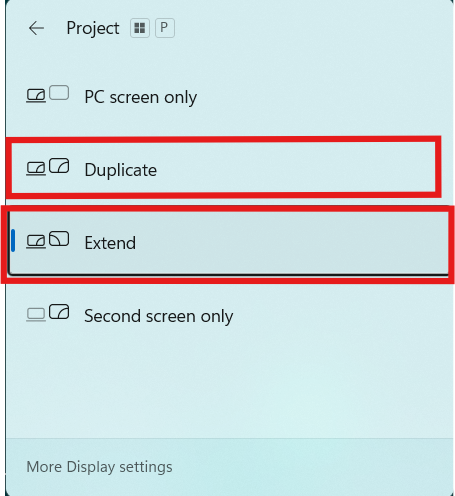
If you see your desktop only on a secondary screen (like a laptop), press:
Windows Key + P
Select Duplicate or Extend.
📝 If It Still Doesn’t Work:
If there’s still no display after all steps:
- Try connecting the monitor to another computer to isolate the issue.
- Note any beeping sounds or flashing lights on your PC (can help IT diagnose).
- Escalate to IT by submitting a ticket with the steps you've already tried.
|
Rate this Topic:
|
|||
|
